
Cybercriminals are getting better at making scam emails look like the real thing — but there are still clear warning signs if you know where to look.
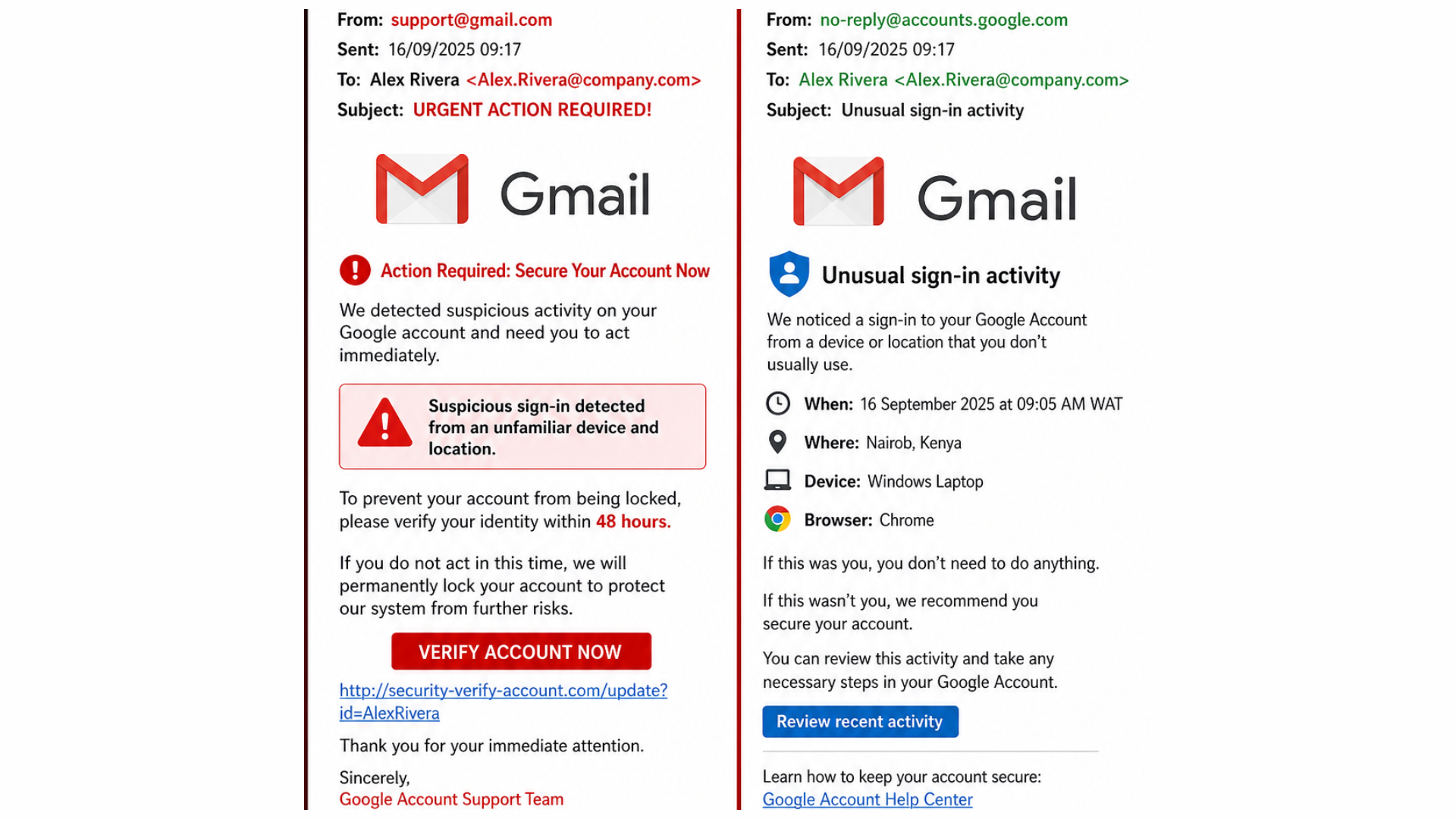
In our example, the email on the left is fake, and the one on the right is legit. Here’s what you should be watching out for in any “security alert” message:
🕵️♂️ Suspicious sender address
The fake email comes from a generic address like support@gmail.com, not an official domain.
The real notice uses an address tied to the service, such as no-reply@accounts.google.com.
If the sender claims to be your bank, Microsoft, Google, or your IT provider but the domain is a free email service (Gmail, Yahoo, Hotmail) or a look‑alike like microsof1-support.com, treat it as a red flag.
⏰ Over-the-top urgent language
The fake email uses panic phrases like “URGENT ACTION REQUIRED!”, “Secure Your Account Now”, and “Your account will be locked within 48 hours.”
Legitimate security alerts explain the issue and what happened, but they generally avoid threats or countdowns designed to scare you.
Phrases like “act now,” “immediate action required,” “your account will be suspended in 24/48 hours,” or “failure to comply will result in consequences” are classic phishing tactics.
⚠️ Threats and pressure to click a button
The fake message pushes you to click “VERIFY ACCOUNT NOW” and go to a verification page.
The real one says “If this was you, you don’t need to do anything” and lets you review recent activity from inside your account.
Phishing emails almost always funnel you into a single urgent button or link where they steal your credentials. If an email wants you to “log in” through a link instead of going directly to the site you know, stop.
🔍 Generic content and missing details
The fake email talks vaguely about “suspicious activity” without specifying a device, time, or location.
The real email lists the when, where, device, and browser used for the sign‑in.
Legitimate providers want you to verify specific events; scammers keep it vague so their story works on anyone.
🔗 Links that don’t match the brand
In the fake email, the URL behind “verify” goes to a non‑Google domain (for example, security-verify-account.com/update?…).
The real email sends you to official help pages or to review activity from within your account.
Always hover over links before you click. If the domain is misspelled, has extra words before or after the brand name, or uses an odd country extension, it’s safer to delete the email. Need more help, reach out to Bernie Orglmeister at support@skyviewtek.com or call 610‑590‑5006.